


बोलपत्रदाता दर्ता प्रक्रिया पुस्तिका ।
Summary
4. Fill-up the required fields.5. Fillup like below. a. Setup authenticator.
Auto-generated and may contain errors. Check the original notice before you act on it.
Files
- b815755c-9958-4778-b582-e318904cd04d.pdfPDF · 14 pages · 2.5 MBOpen
Key details
- Organization
- Public Procurement Monitoring Office
- Industry
- Gov. Authority/Autonomo. Body
- Category
- Tender/Bids
- Published
- Notice date
- Fiscal year
- FY 2083/84
- Source
- View on the original website
Text extracted automatically from the notice (may contain errors)
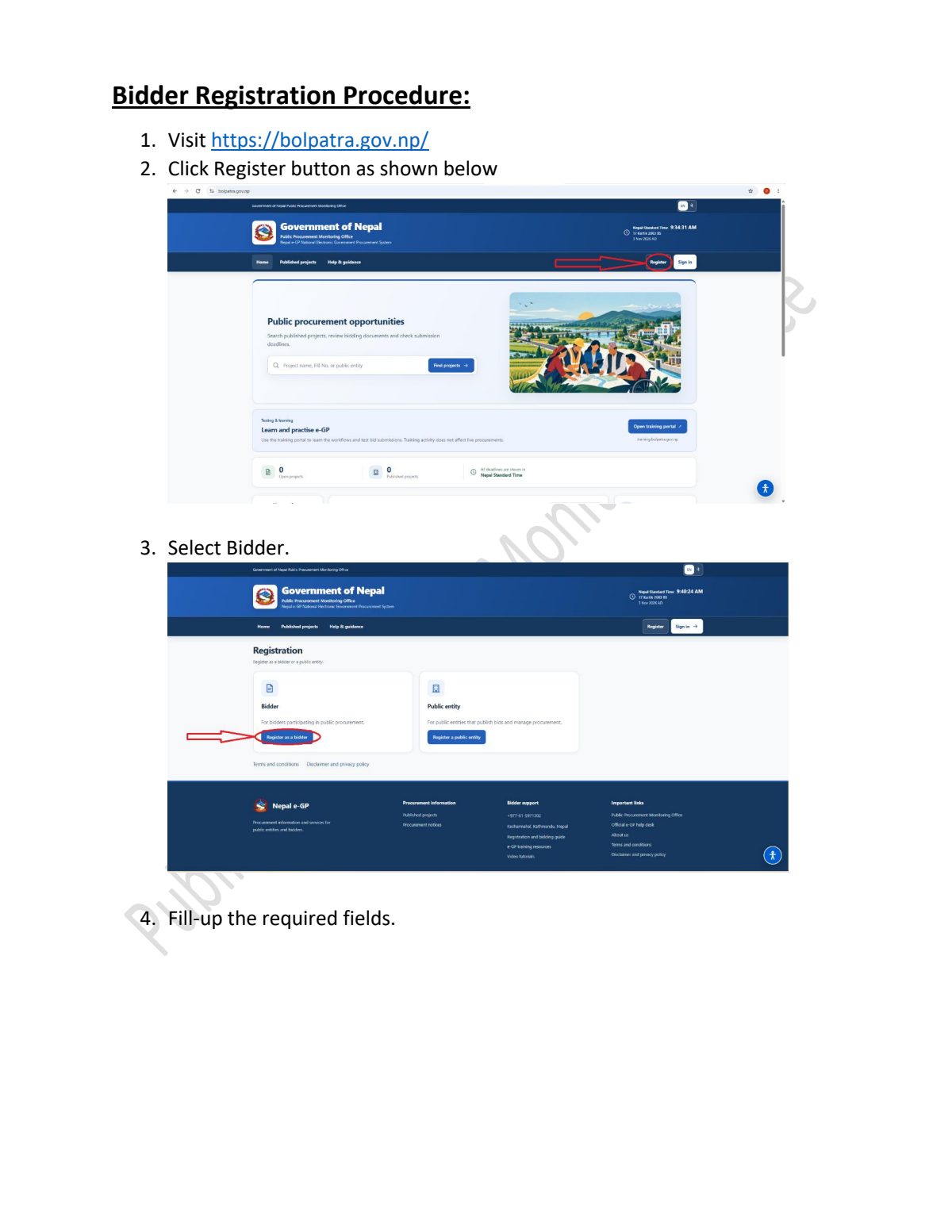
Bidder Registration Procedure: 1. Visit https://bolpatra.gov.np/ 2. Click Register button as shown below 3. Select Bidder. 4. Fill-up the required fields.5. Fillup like below. 6. After clicking register button then check email.7. After clicking verify email and continue button. a. Setup authenticator. b. Use authenticator app installed in smart phone. - Google Authenticator - Microsoft Authenticator - FreeOTP c. Open the application and scan the barcode: d. Enter the one-time code provided by the application and click Submit. 8. After clicking the submit button then following screen is shown.- Password must contain at least 12 min length. 9. After choose new password and confirm it then submit.
 Like
0
 Views
2
 Comments
0
 Share
0

Save

Report